Boundary & Normals
This page covers operations on boundary surfaces: normal computation and orientation, surface splitting and combining, and shadow point generation.
Normal Computation
Normals are computed via PCA on local neighborhoods (Hoppe et al. 1992). For each point, a k-nearest neighbor set is found, the covariance matrix of the local neighborhood is formed, and the eigenvector corresponding to the smallest eigenvalue gives the normal direction.
normals = compute_normals(points; k=10)The keyword k (default 5) controls the neighborhood size — larger values produce smoother normals but may miss sharp features.
Normal Orientation
After computation, normals point in arbitrary directions (PCA gives an axis, not a direction). Consistent orientation uses a minimum spanning tree with DFS traversal: 2. Build a k-nearest neighbor graph weighted by 1 - |nᵢ ⋅ nⱼ| (normals pointing similarly have low weight)
Compute the minimum spanning tree
Start from the point with the highest coordinate value (guaranteed to be on the convex hull)
DFS through the MST, flipping each normal to agree with its parent
orient_normals!(normals, points; k=10)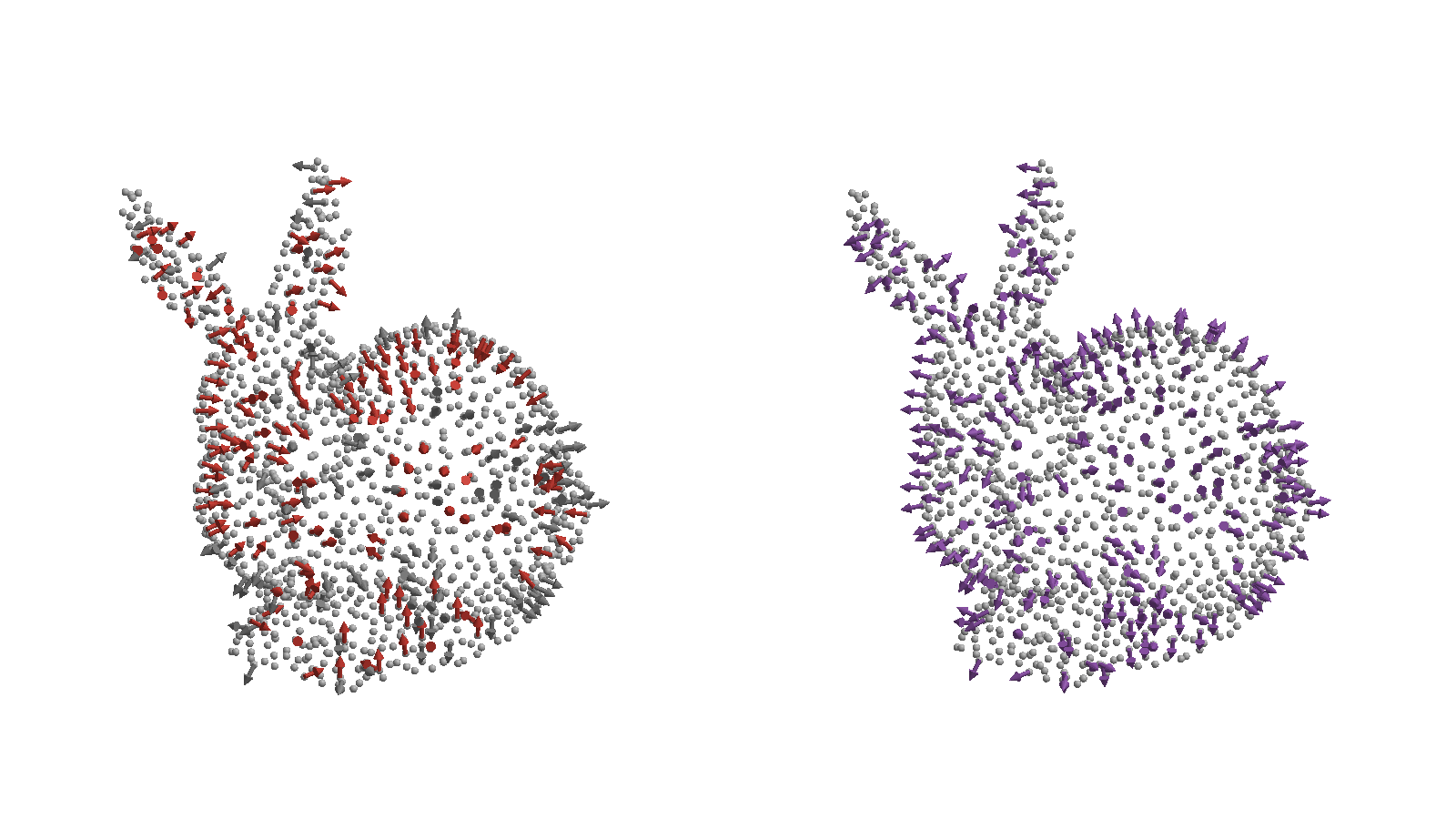
Left: raw PCA normals — each sign is arbitrary, and the red arrows point the wrong way. Right: after orient_normals!, every normal points consistently outward.
To recompute normals in place on an existing surface (e.g. after its points change), then re-orient them:
update_normals!(surf; k=10)
orient_normals!(surf; k=10)
Surface Splitting
Identify distinct geometric faces (walls, inlets, outlets) so you can apply different boundary conditions to each.
split_surface! divides a surface into sub-surfaces based on normal angle discontinuities: 2. Build a k-nearest neighbor graph on the surface points
Remove edges where the angle between adjacent normals exceeds the threshold
Find connected components in the pruned graph
Each connected component becomes a new named surface
split_surface!(boundary, 75°)

# Check the result
names(boundary)  # e.g. [:surface1, :surface2, :surface3]
Surface Combining
Merge multiple named surfaces back into one:
combine_surfaces!(boundary, :surface1, :surface2)The first name is kept and the second surface is merged into it.
Shadow Points
Shadow points are virtual points offset inward from the boundary along the normal direction. They are used in some meshless methods for enforcing boundary conditions (e.g., Hermite-type RBF-FD).
Constant offset:
shadow = ShadowPoints(0.5mm)
shadow_pts = generate_shadows(surf, shadow)
Variable offset (function of position):
shadow = ShadowPoints(p -> spacing(p), 1)  # order parameter
shadow_pts = generate_shadows(surf, shadow)
The offset is applied in the inward direction (opposite to the outward normal).
References
- Hoppe, H., DeRose, T., Duchamp, T., McDonald, J., & Stuetzle, W. (1992). Surface reconstruction from unorganized points. SIGGRAPH '92.