Discretization
Volume discretization generates interior points from a boundary surface. This is typically the second step in the workflow after importing a surface mesh — see the Guide for the full pipeline.
cloud = discretize(boundary, spacing; alg=algorithm)The max_points keyword is a safety limit that prevents runaway point generation. For the Orthtree algorithm it defaults to an automatic estimate from the spacing integral (∫ 1/h(x)ᴺ dx, with N the spatial dimension), sized so the fill saturates rather than truncates; for all other algorithms it defaults to 10 million. If the cap binds before the domain is filled, discretization stops early and warns.
Not sure what spacing the geometry can host? Run suggest_spacing first — it reports the domain extent, the coarsest fillable spacing (h_ceiling), and a recommended baseline (h_baseline) with estimated point counts.
Algorithm Overview
| Algorithm | Dimensions | Spacing Required | Description |
|---|---|---|---|
SlakKosec | 3D | Yes | Sphere-based candidate generation |
VanDerSandeFornberg | 3D | Yes (ConstantSpacing only) | Grid projection with sphere packing |
FornbergFlyer | 2D | Yes (ConstantSpacing only) | 1D projection with height-field fill |
Orthtree | 2D/3D | Yes (variable-friendly) | Tree-guided adaptive fill (octree in 3D, quadtree in 2D); default :bridson placement is a global graded Poisson-disk front |
Choosing an Algorithm
2D problems:
Orthtreeis the default — omitalgand it is built from the boundary loops for you (Orthtree(bnd; spacing)if you want to configure it).FornbergFlyerremains available for the older height-field fill, but requiresConstantSpacingand gives no Poisson-disk guarantee.3D with variable spacing: Use
OrthtreewithBoundaryLayerSpacingfor strong near-wall refinement, orSlakKosecwithLogLikefor simpler variable spacing.3D with uniform spacing:
SlakKosec(default) orVanDerSandeFornbergboth work. SlakKosec is more general; VanDerSandeFornberg can be faster for simple geometries.Large 3D meshes: Use
Orthtreeor pass aTriangleOctreetoSlakKosecfor acceleratedisinsidequeries. See the Point-in-Volume & Orthtree page.
Orthtree Algorithm
Adaptive tree-based algorithm (octree in 3D, quadtree in 2D) that uses the provided spacing function to decide local point density. This makes it suitable for boundary-layer-style discretizations.
The default placement mode is :bridson — a single global advancing-front Poisson-disk pass (Bridson 2007), graded to the spacing field and seeded from the boundary points, so every generated point keeps its distance from every other point and the wall by construction. The front stops on its own once the domain is saturated, so max_points can be left unset (it becomes a non-truncating cap estimated from the spacing integral). Per-leaf :random, :jittered, and :lattice placements remain available.
mesh = import_mesh("model.stl", u"m")

spacing = BoundaryLayerSpacing(
	points(PointBoundary(mesh));
	at_wall=0.6m,
	bulk=4.0m,
	layer_thickness=8.0m,
)

boundary = PointBoundary(mesh, spacing)   # Poisson-disk surface sampling
alg = Orthtree(mesh; spacing, max_growth=0.15)  # gradient-limited grading
cloud = discretize(boundary, spacing; alg)
max_growth caps how fast the spacing may vary between neighboring points (a Lipschitz limit on |∇h|) — steep boundary layers stay sharp at the wall but transition smoothly into the bulk. See the Orthtree Algorithm page for details.
The result of exactly this recipe on a vessel bifurcation:
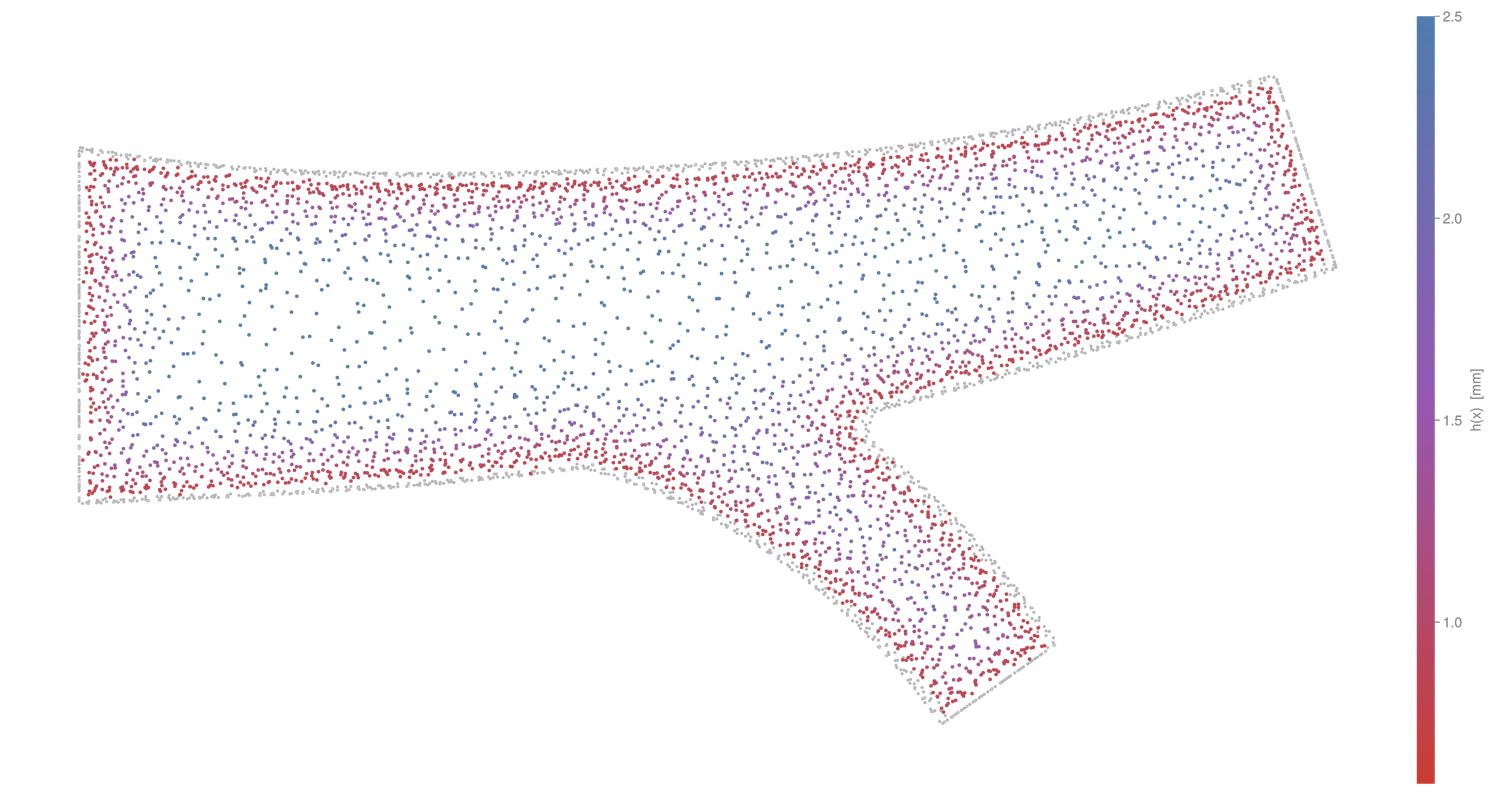
Interior cross-section of a vessel bifurcation filled with Orthtree + BoundaryLayerSpacing, each point colored by its local target spacing h(x) — red at the wall, blue in the bulk.
For a complete runnable script, see:
SlakKosec
Default algorithm for 3D discretization. Generates candidate points on spheres around existing points, accepting those that are inside the domain and sufficiently far from existing points.
# Basic usage
cloud = discretize(boundary, spacing; alg=SlakKosec())

# Custom number of candidates per sphere (default: 10)
cloud = discretize(boundary, spacing; alg=SlakKosec(20))

# With octree acceleration for faster isinside queries
octree = TriangleOctree(import_mesh("model.stl", u"m"); min_ratio=1e-6)
cloud = discretize(boundary, spacing; alg=SlakKosec(octree))
cloud = discretize(boundary, spacing; alg=SlakKosec(20, octree))
Supports both ConstantSpacing and variable spacings (LogLike).
VanDerSandeFornberg
3D algorithm that projects a 2D grid onto the shadow plane and fills the volume layer by layer using sphere packing heights.
cloud = discretize(boundary, ConstantSpacing(1mm); alg=VanDerSandeFornberg())Requires ConstantSpacing. Uses isinside (Green's function) for filtering generated points.
FornbergFlyer
2D-only algorithm. Uses a similar height-field approach as VanDerSandeFornberg, but projects onto the x-axis for 2D domains.
cloud = discretize(boundary, ConstantSpacing(0.1mm); alg=FornbergFlyer())Must be requested explicitly — Orthtree is the 2D default, and the only 2D option for graded spacing.
Spacing Types
Spacing controls point density for all algorithms.
ConstantSpacing
Uniform spacing everywhere in the domain:
spacing = ConstantSpacing(1mm)Works with all algorithms.
BoundaryLayerSpacing
Variable spacing specifically designed for boundary-layer refinement.
spacing = BoundaryLayerSpacing(
	points(boundary);
	at_wall=0.6m,
	bulk=4.0m,
	layer_thickness=8.0m,
)at_wallcontrols the smallest spacing near the boundary.bulkcontrols the largest spacing far from the boundary.layer_thicknesssets how fast spacing transitions from wall to bulk.
boundary_points must be non-empty; distance queries are KDTree-accelerated. Works especially well with Orthtree.
LogLike
Variable spacing that is denser near the boundary and coarser in the interior. Uses a logarithmic-like growth function:
spacing = LogLike(cloud, base_size, growth_rate)cloud— An existingPointCloud. LogLike uses the cloud's boundary points to compute distances, so you must first create a cloud withConstantSpacing, then useLogLikefor a second-pass refinement.base_size— Spacing at the boundary surface.growth_rate— Rate at which spacing increases away from the boundary. Values > 1 create coarser interior points.
The spacing at a point is computed as base_size * x / (a + x) where x is the distance to the nearest boundary point.
Works with SlakKosec and Orthtree.
Typical workflow:
# First pass with uniform spacing
cloud = discretize(boundary, ConstantSpacing(1mm); alg=Orthtree(mesh))

# Second pass with variable spacing
spacing = LogLike(cloud, 0.5mm, 1.2)
cloud = discretize(boundary, spacing; alg=Orthtree(mesh))
References
Slak, J. & Kosec, G. (2019). On generation of node distributions for meshless PDE discretizations. SIAM Journal on Scientific Computing, 41(5).
Van der Sande, K. & Fornberg, B. (2021). Fast variable density 3-D node generation. SIAM Journal on Scientific Computing, 43(1).
Fornberg, B. & Flyer, N. (2015). Fast generation of 2-D node distributions for mesh-free PDE discretizations. Computers & Mathematics with Applications, 69(7).