Getting Started
This tutorial walks through a complete 2D steady-state heat conduction simulation — from geometry to results. Along the way, it explains the key types and how they compose.
Installation
using Pkg
Pkg.add(["WhatsThePoint", "RadialBasisFunctions", "Macchiato"])
Step 1: Define the Geometry
Every simulation starts with a point cloud — a set of scattered points that discretize the domain boundary and interior. WhatsThePoint.jl handles this.
using WhatsThePoint
using Unitful: m, °

# Create a 1m × 1m rectangle boundary with points and normals
part = PointBoundary(rectangle(1m, 1m)...)

# Split the continuous boundary into 4 named surfaces at 75° corners
split_surface!(part, 75°)
# This creates :surface1 (bottom), :surface2 (right), :surface3 (top), :surface4 (left)
PointBoundary{Meshes.𝔼{2}, CoordRefSystems.Cartesian2D{CoordRefSystems.NoDatum, Unitful.Quantity{Float64, 𝐋, Unitful.FreeUnits{(m,), 𝐋, nothing}}}}
├─196 points
└─Surfaces
├─surface1
├─surface2
├─surface3
└─surface4Splitting at corners creates named surfaces so you can assign different boundary conditions to each edge. Now fill the interior:
# Discretize: place interior points at 1/50 m spacing, matching the boundary
dx = 1/50 * m
cloud = discretize(part, ConstantSpacing(dx))
PointCloud{Meshes.𝔼{2}, CoordRefSystems.Cartesian2D{CoordRefSystems.NoDatum, Unitful.Quantity{Float64, 𝐋, Unitful.FreeUnits{(m,), 𝐋, nothing}}}}
├─2840 points
├─Boundary: 196 points
│ ├─surface1
│ ├─surface2
│ ├─surface3
│ └─surface4
├─Volume: 2644 points
└─Topology: NoTopologyThe resulting PointCloud contains both boundary points (organized by surface) and interior (volume) points. In 2D, discretize uses the Fornberg–Flyer advancing-front algorithm; pass alg= to choose a different one in 3D.
Step 2: Define the Physics Model
Physics models define the PDE being solved. For heat conduction, use SolidEnergy:
using Macchiato

model = SolidEnergy(k=1.0, ρ=1.0, cₚ=1.0)
Energy: (k = 1.0, ρ = 1.0, cₚ = 1.0)This defines the heat equation with thermal conductivity k, density ρ, and specific heat cₚ.
Solving your own PDE?
SolidEnergy is one of several built-in models, but you can define a model for any PDE. See the Custom PDEs tutorial to learn how.
Step 3: Define Boundary Conditions
Boundary conditions are specified as a Dict mapping surface names to BC objects:
bcs = Dict(
    :surface1 => Temperature(0.0),    # bottom: T = 0
    :surface2 => Temperature(0.0),    # right:  T = 0
    :surface3 => Temperature(100.0),  # top:    T = 100
    :surface4 => Temperature(0.0)     # left:   T = 0
)
Dict{Symbol, PrescribedValue{Macchiato.var"#48#49"{Float64}}} with 4 entries:
:surface4 => Temperature
:surface3 => Temperature
:surface2 => Temperature
:surface1 => TemperatureTemperature is a Dirichlet BC — it prescribes the value directly. The BC system is organized by mathematical type:
| Type | Meaning | Energy Examples |
|---|---|---|
| Dirichlet | Prescribes value: u = g | Temperature |
| Neumann | Prescribes flux: ∂u/∂n = q | HeatFlux, Adiabatic |
| Robin | Mixed: α u + β ∂u/∂n = g | Convection |
All BCs accept either a constant value or a function (x, t) -> value for spatially or temporally varying conditions:
# Spatially varying temperature
Temperature((x, t) -> 100.0 * sin(π * x[1]))

# Insulated boundary (zero heat flux)
Adiabatic()

# Convective cooling: h=10, k=1, T_ambient=25
Convection(10.0, 1.0, 25.0)
See the API Reference for the complete list of boundary condition types.
Named BCs are aliases for generic types
Temperature, HeatFlux, and Adiabatic are constructor functions that create PrescribedValue, PrescribedFlux, and ZeroFlux instances with a physics-meaningful display name. When defining a custom PDE, you can use the generic constructors directly — PrescribedValue(0.0), PrescribedFlux(1.0), ZeroFlux() — with no trait boilerplate required.
Step 4: Create the Domain
The Domain ties geometry, boundary conditions, and model together:
domain = Domain(cloud, bcs, model)domain1: Domain
SolidEnergy{Float64, Float64, Float64, Nothing}[Energy: (k = 1.0, ρ = 1.0, cₚ = 1.0)]The Domain validates that every BC key matches a surface in the point cloud.
Step 5: Create and Run the Simulation
The same domain solves either way — only the simulation mode changes. Simulation defaults to steady-state when no mode is given.
sim = Simulation(domain)
run!(sim)
Simulation
├── Mode: Steady-state
├── Time: 0.0
└── Running: falserun! calls LinearSolve.LinearProblem(domain) internally, which: 2. Asks the model to build its system matrix and RHS via make_system
Applies each BC by modifying the appropriate matrix rows
Solves the sparse linear system with LinearSolve.jl
The rest of this guide uses the steady-state sim.
Step 6: Extract and Visualize Results
using WhatsThePoint: coords
using Unitful: ustrip
using CairoMakie

# Extract the temperature field
T = temperature(sim)

# Visualize the temperature field
pts = points(cloud)
x = [ustrip(coords(pt).x) for pt in pts]
y = [ustrip(coords(pt).y) for pt in pts]

fig = Figure(; size=(800, 700))
ax = Axis(fig[1, 1]; title="Temperature", xlabel="x [m]", ylabel="y [m]", aspect=DataAspect())
sc = scatter!(ax, x, y; color=T, colormap=:inferno, markersize=12)
Colorbar(fig[1, 2], sc; label="T")
fig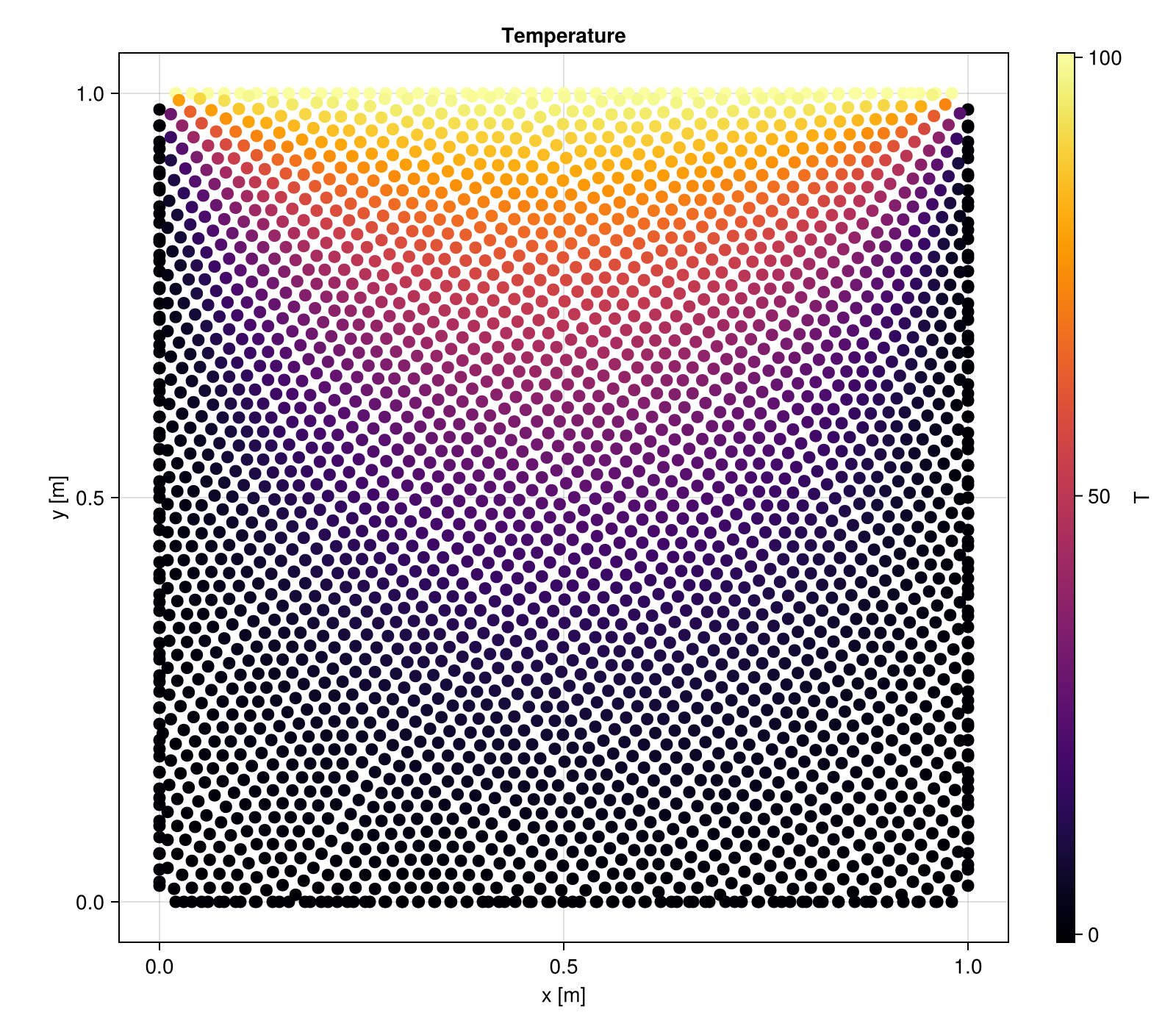
Each physics model has dedicated field extraction functions:
temperature(sim)— forSolidEnergydisplacement(sim)— forLinearElasticity, returns(ux, uy)or(ux, uy, uz)velocity(sim),pressure(sim)— forIncompressibleNavierStokes
Next Steps
Custom PDEs — solve your own equation instead of a built-in model
Examples — complete worked examples, including linear elasticity
Package Design — how the pieces fit together, and how to add new physics